
Aprox keeps its settings short. Most of what it does works without configuration; Settings is where you manage Aprox Pro, turn on alerts, choose how long tasks are followed, pick the default console types, and collect a diagnostics report when something goes wrong. This article describes every setting.
Where to find it
- iPhone, iPad and Android: Sidebar › Settings, at the bottom of the sidebar.
- Mac: Aprox › Settings… or ⌘,. Settings open in their own window.
Import Servers
Shown at the top only while servers from Aprox 3 are left to import. On Android the section is titled Earlier Version.
| Setting | What it does |
|---|---|
| Import Servers | Brings back the servers saved by Aprox 3 on this device, together with any saved passwords. The old data is only read, never changed. |
See Import servers from Aprox 3.
Aprox Pro
| Setting | What it does | Platforms |
|---|---|---|
| Plan | Your current plan: Free, Aprox Pro — Lifetime, Aprox Pro — Yearly or Aprox Pro — Monthly. | all |
| Renews | The renewal date of your subscription. | iPhone, iPad, Mac |
| Upgrade to Aprox Pro | Opens the Aprox Pro screen. Shown on the free plan. | all |
| Restore Purchases (Android: Restore purchases) | Checks your purchases with the store again. On success it confirms "Aprox Pro restored." | all |
| Manage Subscription | Opens your store's subscription management. Shown while you have a subscription. | all |
| Terms of Use, Privacy Policy | Open the legal pages on aproxapp.de. | all |
On the free plan, this section also contains one promotion row. See Aprox Pro for what Pro includes, and Promotions on the free plan.
Alerts
Alerts are local notifications when something breaks on one of your servers. They need Aprox Pro.
| Setting | Default | What it does |
|---|---|---|
| Alert me about problems | Off | The main switch. Turning it on asks for notification permission. On the free plan it opens the Aprox Pro screen. |
| A node goes offline | On | Alert when a node, or a whole server, stops answering. |
| A task fails | On | Alert when a task fails, including failed backups. |
| A guest stops on its own | On | Alert when a running guest stops without anything on the server asking it to. |
| A storage passes 90% full | On | Alert when a storage or a Backup Server datastore reaches 90%. |
The footers explain when alerts arrive. Aprox waits for a second bad reading in a row before it alerts you. On iPhone and iPad, background checks depend on Background App Refresh; on Android, on battery optimization; on the Mac, Aprox must be running. If notifications are turned off for Aprox in the system settings, the section says so.
See Alerts and notifications for the details.
Follow long tasks
| Setting | Default | Platforms | What it does |
|---|---|---|---|
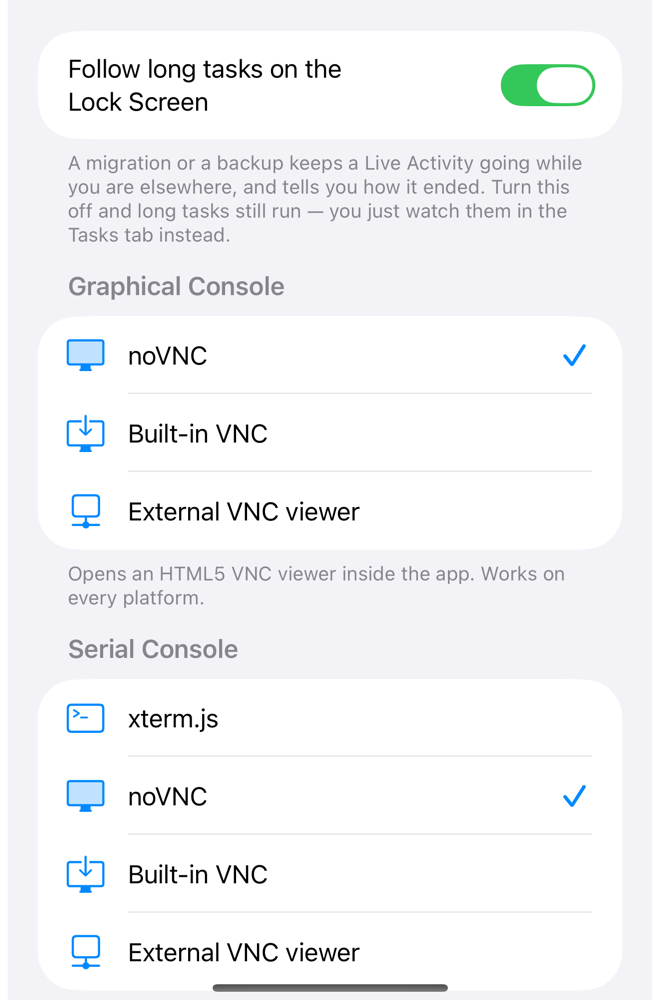
| Follow long tasks on the Lock Screen | On | iPhone, iPad | Backups, restores, clones, migrations and destroys you start in Aprox keep a Live Activity going while you are elsewhere, and tell you how they ended. |
| Follow long tasks in a notification | On | Android | The same as a progress notification. |
Turn it off and long tasks still run; you follow them in the Tasks tab instead. See Live Activities.
Menu Bar
Mac only.
| Setting | Default | What it does |
|---|---|---|
| Show cluster status in the menu bar | On | Puts every connected cluster one click away in the menu bar, with start and shutdown buttons for each guest. The icon turns into a warning when a node stops reporting. |
See Aprox on the Mac.
Sidebar
Android only. On iPhone, iPad and Mac, the same choice is in the sidebar's Group By menu.
| Option | What it does |
|---|---|
| Node (default) | Groups guests and storages under their node. |
| Pool | Groups guests by pool. Guests without a pool go under No Pool. |
| Tag | Groups guests by tag. A guest with several tags appears under each; untagged guests go under Untagged. |
With Pool or Tag, nodes and storages go into a group Nodes and Storage. See Find your way around.
Graphical Console
The console type used for virtual machines with a normal display. The footer explains the chosen type.
| Option | What it is |
|---|---|
| noVNC (default) | Proxmox's HTML5 VNC viewer inside the app. Works on every platform. |
| Built-in VNC | Aprox draws the screen natively, with keyboard layout mapping and an on-screen keyboard with modifier keys. |
| External VNC viewer | Hands the session to another VNC app. Mac and Android only; on iPhone and iPad the console says "External viewers require macOS." |
Serial Console
The console type used for containers and for virtual machines whose display is a serial port.
| Option | What it is |
|---|---|
| noVNC | Proxmox's HTML5 VNC viewer. |
| xterm.js | Proxmox's HTML5 terminal. Best for shell access. |
| Built-in VNC | Aprox's native viewer. On Android, serial consoles stay in the web console. |
| External VNC viewer | Another VNC app (Mac and Android). |
Tip
On iPhone, iPad and Mac, containers open in xterm.js until you choose a serial console type here. Pick one explicitly if you prefer another. On Android the default is noVNC.
Node shells always open in xterm.js, whatever you choose. Consoles need Aprox Pro and a password login. See Console.
Active VNC bridges
Mac only, and shown only while an external viewer is connected through Aprox.
| Setting | What it does |
|---|---|
| Each running bridge, with Stop | Ends the local bridge that connects the external VNC viewer to the guest. |
See External VNC viewer.
Diagnostics
A report of this session's activity, useful when you report a problem. Hostnames, usernames and credentials are redacted.
| Setting | Platforms | What it does |
|---|---|---|
| Collect Diagnostics, then Share Diagnostics | iPhone, iPad, Android | Builds the report ("Collecting diagnostics…") and opens the share sheet, for example to send it by e-mail. |
| Copy Diagnostics | Mac | Copies the report to the clipboard. |
| Report an Issue | all | Opens a new issue on GitHub with the report attached. On iPhone, iPad and Mac the full report is also copied to the clipboard, so you can paste it if it was shortened. |
See Diagnostics report.
What is not in Settings
- Appearance: Aprox follows the system's light or dark mode.
- Language: Aprox uses the language set for it in the system. See Languages.
- Servers: you add, edit and remove servers in the sidebar. See Edit, sign out or remove a server.