
Proxmox Backup Server keeps datastores healthy with scheduled jobs: prune jobs remove old snapshots by a retention policy, verify jobs check backups for damage, and sync jobs copy backups to or from another Backup Server. Aprox lists every job of a datastore with its schedule and last result, and lets you run, create, edit and delete them. Viewing is free. Running a job and changing jobs need Aprox Pro.
Where to find it
Sidebar › your Backup Server › Datastores › the datastore › Jobs.
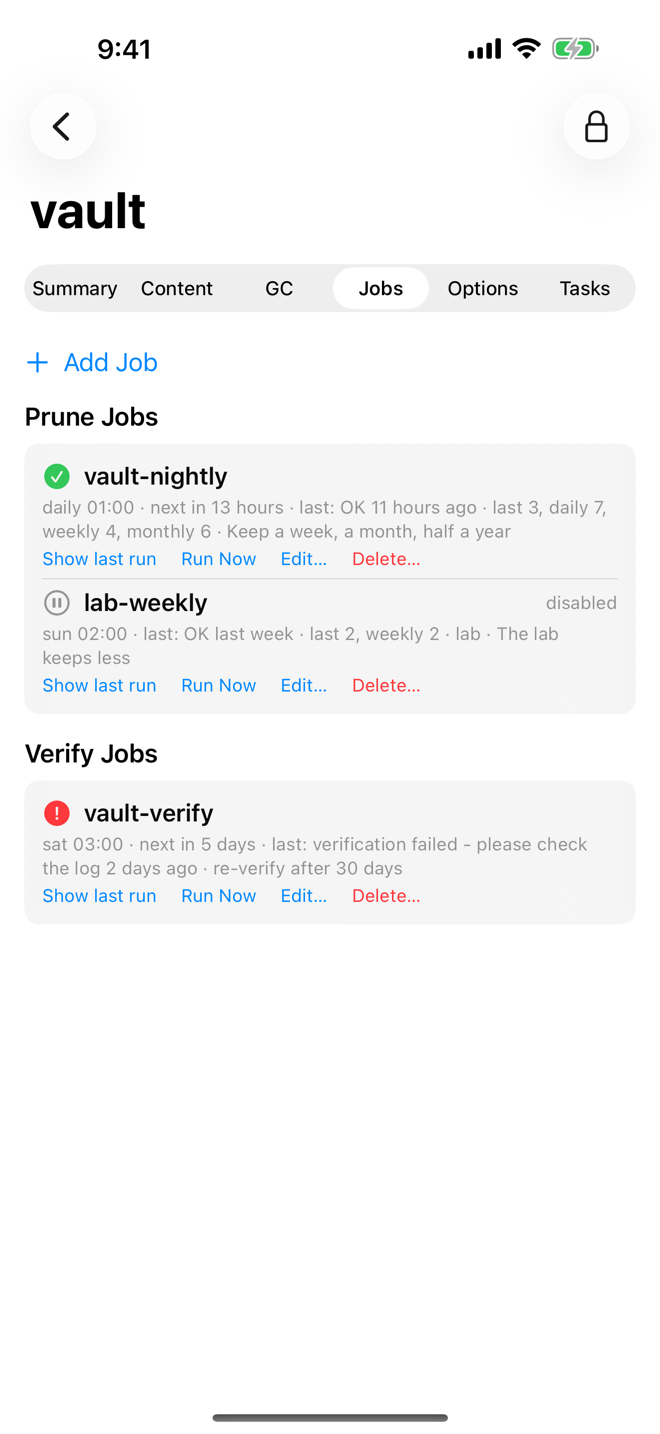
Read the job list
Jobs are grouped under Prune Jobs, Verify Jobs and Sync Jobs. Each row shows:
- the job ID, and disabled when the job is switched off;
- an icon for the last result: a green check for success, a red sign for failure, a dotted circle if it has not run yet, a pause sign if disabled;
- a summary line: the schedule, the next run, the last result and when it was, and job details such as the retention policy ("last 3, daily 7"), the remote and datastore of a sync job, or "re-verify after N days";
- the buttons Show last run, Run Now, Edit… and Delete….
If the datastore has no jobs, the tab reads "No prune, verify or sync jobs use this datastore."
See the last run
- Tap Show last run on a job.
- The task log of its last run opens. See Tasks and logs.
Run a job now
Needs Aprox Pro.
- Tap Run Now on the job.
- Confirm "Run <job> now?". The job "runs now with its saved settings, outside its schedule." For a prune job, Aprox warns first: "This job removes snapshots."
- Tap Run Now. Aprox shows "Starting <job>…" and follows the task.
Add a job
Needs Aprox Pro.
- Tap Add Job and choose Prune Job, Verify Job or Sync Job.
- Fill in the common fields and the fields for the job type (see below). The sheet is titled New Prune Job, New Verify Job or New Sync Job.
- Tap Save. Aprox shows Saving… and then Saved.
Common fields
| Field | What to enter |
|---|---|
| Job ID | A unique name, for example daily-prune. It cannot be changed later. |
| Datastore | The datastore you are on. Shown for reference. |
| Schedule | When the job runs, as a Backup Server calendar event, for example daily, sat 03:00 or mon..fri 22:00. Required for prune jobs; Schedule (optional) for verify and sync jobs. |
| Schedule presets | The calendar button next to the field fills in a preset: hourly, daily, weekly, monthly, sat 03:00, mon..fri 22:00 or *:0/30 (every 30 minutes). |
| Enabled | Prune jobs only. Turn it off to keep the job without running it. |
| Comment | Optional description. |
| Namespace | Which namespace the job works on. Root is the top level. |
| Include namespaces below | Also include every namespace under the chosen one. |
A sync job without a schedule only runs when you start it by hand.
Prune job
Set the Retention with the steppers Keep Last, Keep Hourly, Keep Daily, Keep Weekly, Keep Monthly and Keep Yearly. With nothing set, every snapshot is kept.
Warning
Every run removes what the policy does not keep. Try the policy on one group first with Prune… in the Content tab, which shows a preview. See Browse, verify and prune backups.
Verify job
| Field | Meaning |
|---|---|
| Skip recently verified | Skip snapshots that were already verified. |
| Re-verify After | Shown when skipping is on. Verify a snapshot again once its last verification is this many days old, or never. |
Sync job
| Field | Meaning |
|---|---|
| Direction | Pull copies backups from the remote into this datastore. Push copies backups from this datastore to the remote. |
| Remote | The Backup Server to sync with, chosen from your remotes, or Local to sync between datastores on the same server. |
| Remote Datastore | The datastore on the other side. Aprox lists the remote's datastores when it can read them; otherwise type the name. |
| Remote Namespace | The namespace on the other side, when it has any. |
| Local Owner (optional) | The user or token that owns synced groups here. |
| Transfer Last | Copy only the newest N snapshots of each group. The default is all. |
| Remove Vanished | Delete snapshots here that no longer exist on the source. |
Edit a job
Needs Aprox Pro.
- Tap Edit… on the job. The sheet Edit Prune Job, Edit Verify Job or Edit Sync Job opens with the current settings.
- Change what you need. The Job ID cannot be changed.
- Tap Save.
Delete a job
Needs Aprox Pro.
- Tap Delete… on the job.
- Confirm "Delete job <job>?" with Delete Job.
Only the job is removed; no backups are touched.
Requirements on the server
Typically, prune jobs need Datastore.Prune or Datastore.Modify, and verify jobs need Datastore.Verify. A sync job also needs an account on the remote with access to the datastore it reads from or writes to. If a right is missing, Aprox explains what was refused.
Good to know
- Tape backup jobs are not supported.
- For a one-off check of the whole datastore, use Actions › Verify All…. See Datastores and garbage collection.
- Proxmox VE backup jobs, which write the backups in the first place, are a different thing. See Backup jobs.