
Power actions control whether a virtual machine or container is running. Aprox offers every power action that Proxmox VE has: four for all guests and four more for virtual machines. They are free on every platform and every surface, including Siri, widgets, Control Center and the watch.
Where to find it
| Place | How to get there |
|---|---|
| Guest summary | Sidebar › plex › Summary › Actions card |
| Context menu | Long-press the guest in the sidebar (right-click on a Mac): Start, Shut Down, Reboot, Stop, and More Power Actions › Pause, Resume, Hibernate, Reset |
| Menu bar (Mac, iPad with keyboard) | Guest menu, with keyboard shortcuts (see below) |
| Menu bar extra (Mac) | The play or stop button next to a guest; right-click the guest for all power actions |
| Siri and Shortcuts (Apple) | Start, shut down, reboot and stop |
| Control Center (iPhone, iPad) | The Start or Shut Down Guest control |
| Watch (Apple Watch, Wear OS) | Start, shut down, reboot and stop; virtual machines also pause and resume |
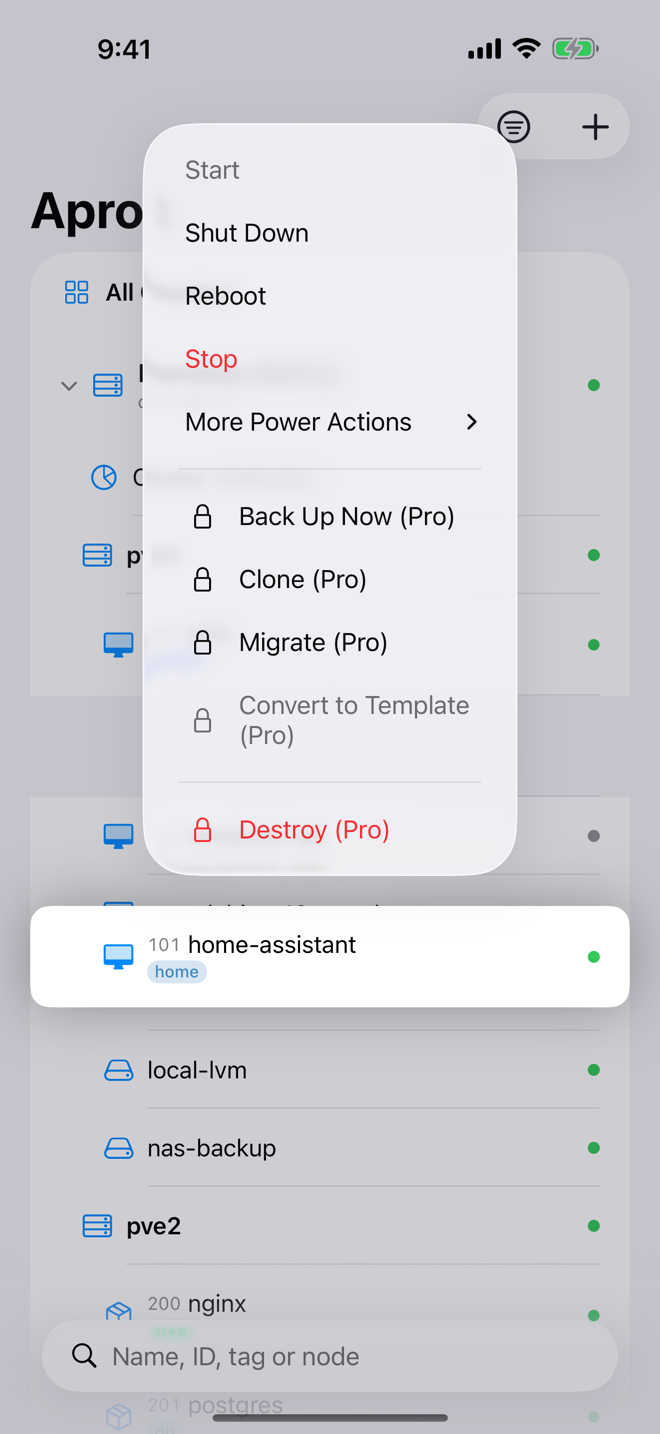
The actions
Buttons that cannot apply in the guest's current state are disabled. For example, Start works only while the guest is stopped, and Resume only while a virtual machine is paused.
| Action | Label on Summary | Applies to | Available when | What it does |
|---|---|---|---|---|
| Start | Start | VM, container | stopped | Boots the guest. A hibernated VM resumes its saved session. |
| Shut Down | Off | VM, container | running | Asks the guest's operating system to shut down cleanly. |
| Reboot | Reboot | VM, container | running | Restarts the guest cleanly. |
| Stop | Stop | VM, container | running or paused | "Cut power without telling the guest." Shown in red. |
| Pause | Pause | VM only | running | "Freeze the guest in memory. It keeps its RAM and resumes instantly." |
| Resume | Resume | VM only | paused | Unfreezes a paused VM. |
| Hibernate | Hibernate | VM only | running | "Write the guest's memory to disk and stop it. Starting it again restores the session." |
| Reset | Reset | VM only | running | "Cut power and boot again immediately, without telling the guest." Shown in red. |
On a Mac, hover over a button on the Summary tab to see this explanation as a tooltip.
Run a power action
- Open the guest, for example plex, or long-press it in the sidebar.
- Tap the action.
- Aprox runs it right away. A haptic tap or a tick confirms success. If Proxmox refuses, the error appears in place, with Details from the server for Proxmox's own message.
- The status in the header and in the sidebar updates within a few seconds.
Important
In the app, power actions run without a confirmation dialog. Stop and Reset cut power like pulling the plug, so unsaved work inside the guest is lost. Use Shut Down or Reboot when you can.
Use the keyboard (Mac, iPad)
On a Mac, or an iPad with a hardware keyboard, the Guest menu has these shortcuts. They act on the selected guest and are enabled only when the action applies.
| Shortcut | Action |
|---|---|
| ⌃⌘R | Start |
| ⌃⌘D | Shut Down |
| ⌃⌘B | Reboot |
| ⌃⌘X | Stop |
| ⌃⌘P | Pause |
| ⌃⌘E | Resume |
| ⌃⌘H | Hibernate |
| ⌃⌘T | Reset |
Shut down versus stop, pause versus hibernate
- Shut Down and Reboot need the guest's cooperation. A virtual machine without ACPI support or a hung operating system may not react; Proxmox then reports the task as failed or still running after its timeout. In that case use Stop or Reset.
- Pause keeps the virtual machine in the node's memory. It is instant, but the node still holds the RAM, and the paused state is lost if the node restarts.
- Hibernate writes the memory to the VM's storage and stops the VM. It frees the node's RAM and survives a node restart. Start restores the session.
Requirements on the server
Power actions typically need the VM.PowerMgmt privilege on the guest (for example on /vms/100). If it is missing, Aprox names the path and privilege in the error.
Good to know
- Confirmations elsewhere. Siri and the Shortcuts action Stop Guest ask before stopping a guest. On the watch, Stop asks first, and Hibernate and Reset are not offered there.
- Background control through Siri, Shortcuts, Control Center and the watch needs a saved password or an API token for the server. See Siri and Shortcuts, Control Center and launcher shortcuts and Watch app.
- Templates cannot be started, so all power actions are disabled for them.
- Locked guests. While a backup, snapshot or migration holds the guest, Proxmox refuses most power actions, for example with "A backup is running on this guest right now." The guest's Tasks tab shows what holds the lock.